
Over the past few weeks, I’ve been working on something that started as a small experiment and quickly turned into a medium sized project. The result is Metis: a local-first, AI-augmented knowledge base built for writing, thinking, and connecting ideas.
The project is fully open source, and you can explore the code, roadmap, and development progress on GitHub: Metis GitHub Repository
Why I Built This
In my day-to-day work, a lot of what I do revolves around writing. Incident reports, architecture docs, detection logic, internal notes, it’s all just structured thinking. And over time, I’ve found that the tools themselves start to introduce friction. Either they abstract too much away, or they try to be too intelligent without actually understanding context.
I’m also a massive fan of taking my own notes, and have some pretty large Obsidian vaults. Obsidian is a great tool and I’ve used it for years at this point, but I wanted something that I could modify to suit my workflows. Something where the source of truth is just files on disk, that doesn’t try to own my data, and where AI isn’t a separate tab, but part of the environment itself. I also wanted tighter control over context and privacy: a system that only has access to the notes and knowledge I explicitly choose to expose to it, rather than indexing an entire digital life by default which is common with other projects, e.g. PAI.
Why “Metis”
The name comes from Greek mythology. Metis is the goddess of wisdom, craft, and what’s often described as “cunning intelligence”. The first wife of Zeus and mother of Athena. Her name literally means “wisdom” or “skill and craft”, and she was revered as the embodiment of prudent intelligence: not raw knowledge, but the ability to think clearly, connect ideas, and act with purpose. Zeus, fearing her wisdom would surpass his own power, swallowed Metis whole — yet her counsel guided him from within, and her daughter Athena was later born fully formed, armoured and wise.
This application takes her name for the same reason: a knowledge base should not merely store information, it should help you think. Metis pairs your own writing and ideas with AI personas that reason alongside you; surfacing connections, refining your thoughts, and acting on your behalf all while keeping every word on your own machine. Like the goddess, the intelligence here is a guide embedded in the work, not a separate oracle you consult from afar.
That felt like the right framing. The goal wasn’t to build a smarter editor. It was to build something that helps with the kind of thinking that isn’t linear.
What it is (and What it isn’t)
At its core, Metis is just a desktop markdown editor. There’s no account system, no backend, and no sync layer. Your notes are plain .md files stored in a folder on your machine. That folder becomes your “vault”, but in reality it’s just a normal directory that you can open, move, or version however you want.
That constraint shapes everything else. Because the files are local, the system has to respect boundaries. Because there’s no central service, features have to work locally. And because there’s no lock-in, the value has to come from the experience itself, not the ecosystem around it. The AI layer follows the same philosophy. It’s not there to replace writing, or generate generic content. It’s there to operate on your existing knowledge, with context.
No Migration, no Lock-in
One of the more intentional decisions was to avoid creating yet another “format” or ecosystem you have to buy into. If you already use something like Obsidian, Logseq, or any other markdown-based system, you don’t need to migrate anything. You can point Metis at your existing vault and start working immediately.
Your folder structure stays the same and the files are still plain markdown. What does change is that Metis can enrich your notes over time. It adds and updates lightweight metadata, e.g. status, aliases, tags, and derived relationships to make navigation, linking, and AI context more effective. This lives in standard frontmatter, so it remains human-readable and compatible with other tools.
And importantly, none of this creates lock-in. If you stop using Metis, your notes are still just markdown files. The metadata is additive, not restrictive, and can be ignored or removed without breaking anything.
Making AI Actually Useful
Metis approaches AI slightly differently to general chat apps. Instead of a single assistant, it uses personas - small, scoped agents that operate on parts of your vault. Some are simple, like aggregating tasks across notes into a single place. Others are more exploratory, and every other persona can be tailored to your unique use cases.
The important part isn’t the specific features. It’s that the AI operates within your system, not outside of it. It has boundaries, context, and a defined surface area.
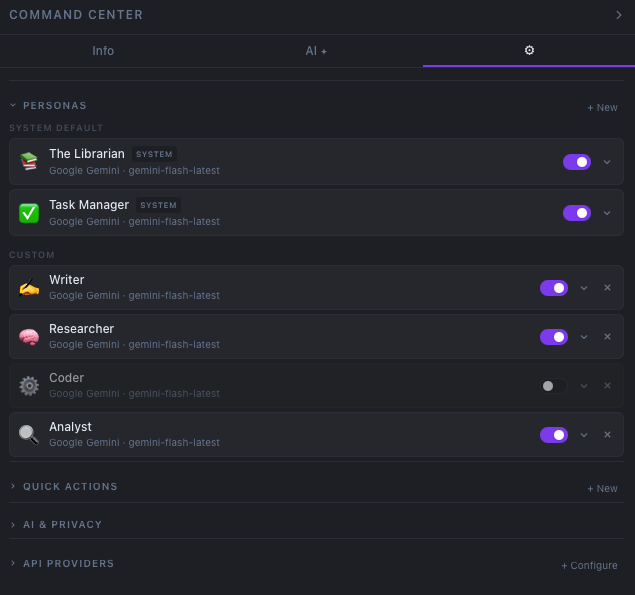 AI Personas in Metis
The Feel of it
A lot of the work went into things that are hard to point to directly. The editor is fast and minimal. You can switch between raw markdown and a rendered view without friction. Links between notes feel instant. If you change files on disk, the UI updates in real time. You can open multiple vaults without losing context. Additionally, I included a planner section which allows you to plan work for the day, perform weekly and monthly reviews, and even track your PTO.
None of this is particularly novel on its own, but together it creates something that feels closer to working in a filesystem than working inside an app.
What I Took Away From Building it
Building Metis reinforced a few things for me.
- AI Prompting has improved tremendously. This entire project was created with Prompt Engineering!
- AI only becomes genuinely useful when it has context. Not more parameters, not better prompts, just better grounding in the data it’s working with.
- For this kind of problem, the filesystem is still one of the best abstractions we have.
What’s Next?
There’s still a lot I want to explore: visualizing how notes connect to each other, adding more flexible ways to structure information, improving planning, creating diagrams from notes, etc. But for now, I’m intentionally keeping things lightweight. This started as a way to explore how I think and write but turned into tool that (hopefully) gets out of the way, while still being smart enough to help when it matters.
I hope you found this post useful and that I’ve convinced you to try out Metis! As always, if you have any questions or comments, please reach out!